 Macon Calendar Tools
Open app
How to print your calendar in the new Outlook
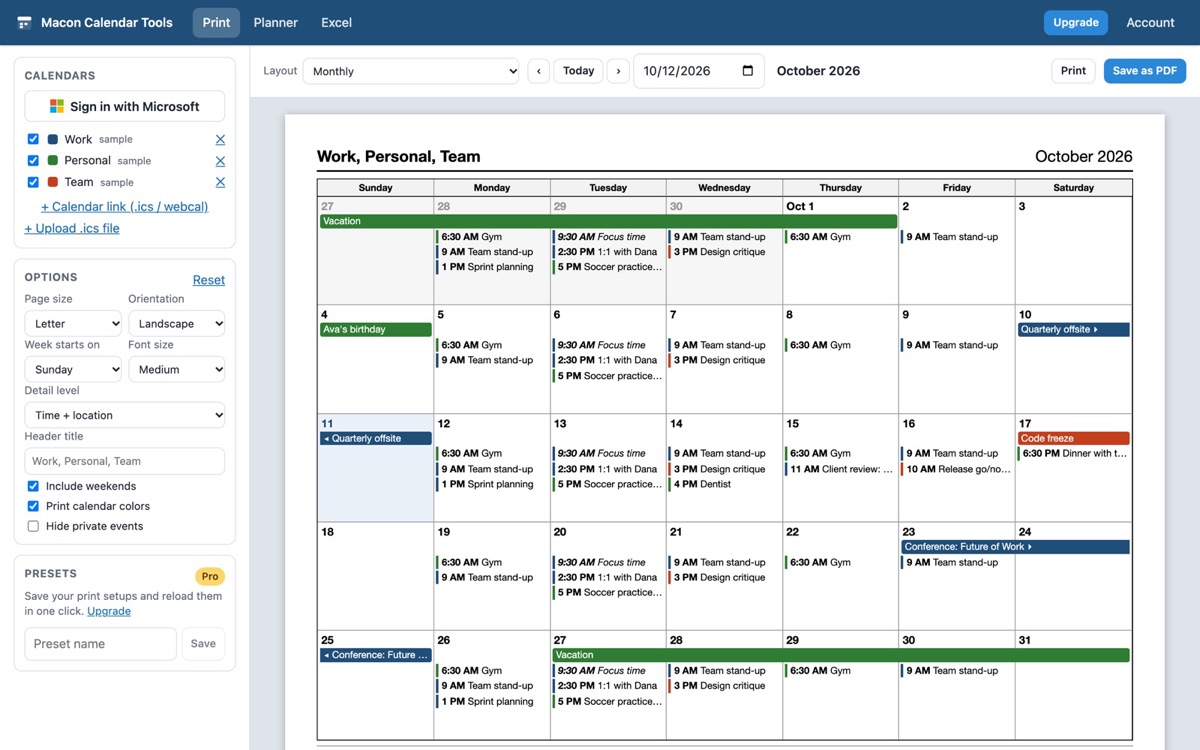
The new Outlook for Windows and Outlook on the web replaced the classic print dialog with a plain "print what is on screen" button. If you miss landscape months, tri-fold pages or a week with details, this is the fix — no switching back to classic.
Print your calendar now Free to try. No account needed.
What changed in the new Outlook
Classic Outlook had a Print dialog with styles — Daily, Weekly Agenda, Weekly Calendar, Monthly, Tri-fold, Calendar Details — and a Page Setup for headers, fonts and paper. The new Outlook (the same code as Outlook on the web) prints the current calendar view and nothing else: no tri-fold, no landscape month on a single page, no multi-week, no details view, and the month view often spills onto a second page. Microsoft has said more print options are planned, but today the workaround most people use is a screenshot.
Print real layouts from the new Outlook in three steps
- Open the app and click Sign in with Microsoft. It reads your Outlook calendars directly, so it works with the new Outlook, classic Outlook, Outlook on the web and Outlook.com alike.
- Pick a layout — monthly, weekly and daily are free; tri-fold, weekly with details, multi-week, yearly and agenda are Pro.
- Click Print, or Save as PDF in the print dialog.
Your calendar stays in your browser; nothing is uploaded. The preview on screen is exactly what comes out of the printer.
Prefer not to sign in?
Publish your calendar from Outlook (Settings → Calendar → Shared calendars → *Publish a calendar* → copy the ICS link) and paste the link into the app, or export an .ics file. Both print the same layouts.
Common new-Outlook print problems this solves
- Month view prints on two pages — the monthly layout fits a 6-week grid on one Letter or A4 page, portrait or landscape.
- No landscape option — every layout has an orientation setting where it makes sense.
- No tri-fold — the tri-fold page puts today, the week and the month side by side, like the classic style.
- Details are cut off — *Weekly with details* and *Monthly with details* show locations, attendees and notes.
- Can't print a date range — the agenda layout prints every event in any range as a list.
Your calendar, mail and contact data are read in your browser straight from Microsoft and are never uploaded to our servers.
Frequently asked questions
Does Microsoft plan to bring print styles back to the new Outlook?
Microsoft has acknowledged the gap and lists print improvements on its roadmap, but as of today the new Outlook prints only the current view. TriFold gives you the classic layouts now.
Do I have to switch back to classic Outlook?
No. The app reads your calendar through your Microsoft account, so it does not matter which Outlook you use day to day.
Which layouts are free?
Monthly, weekly and daily are free forever. Tri-fold, weekly with details, multi-week, yearly and agenda are Pro ($8/month or $59/year).
Does it work with Outlook on the web and Outlook.com?
Yes. Sign in with the same Microsoft account; personal Outlook.com accounts work for printing and Excel export.
Is my calendar uploaded anywhere?
Your calendar, mail and contact data are read in your browser straight from Microsoft and are never uploaded to our servers.