 Macon Calendar Tools
Open app
Print Outlook calendars the classic way — plus Planner feeds and Excel exports
Print your calendar the way classic Outlook did. Put Planner tasks back on your calendar. Export calendar, mail and contacts to Excel. One free web app, also in the Microsoft Store.
Open the free app Free to try. No account needed.
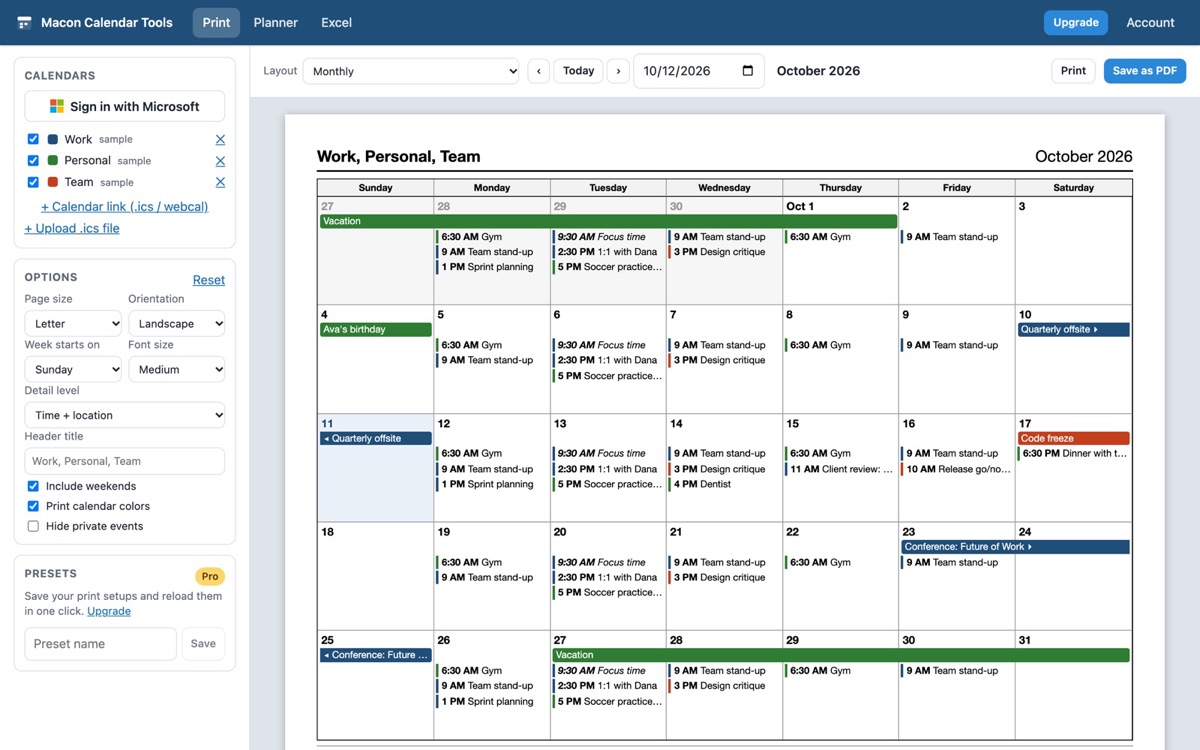
TriFold: print Outlook calendars in classic layouts
The new Outlook only prints what is on screen. TriFold brings back the tri-fold, landscape weekly with details, monthly with all details, multi-week and yearly print styles, as PDF or paper. Sign in with Microsoft, or paste a calendar link from Outlook or Google. Learn more about printing.
PlanFeed: Planner tasks back in your Outlook calendar
Microsoft retired the Planner calendar feed. PlanFeed pushes your Planner tasks into a dedicated Outlook calendar and keeps a subscribable feed that Outlook refreshes on its own, so due dates show up next to your meetings again. Learn more about PlanFeed.
OutlookXL: export Outlook to Excel
Export any date range of your calendar to a spreadsheet with real dates, durations and categories, plus hours-by-category and hours-by-week summaries for timesheets. Export mail folders and contacts too. Learn more about Excel export.
Common problems this solves
- The new Outlook will not print a landscape month or tri-fold
- The calendar prints on two pages or gets cut off
- Save an Outlook calendar as a PDF or print it on a Mac
- "Add plan to Outlook calendar" is gone and Planner tasks are not showing in Outlook
- Turn a calendar into a timesheet or count hours spent in meetings
- See all guides
Works with
- New Outlook and classic Outlook for Windows
- Outlook on the web and Outlook.com (personal accounts)
- Microsoft 365 work and school accounts (Planner needs a work or school account)
- Google Calendar and any calendar that publishes an .ics link
- Any .ics file
Private by design
Your calendar, mail and contact data are read in your browser straight from Microsoft and are never uploaded to our servers. We store only your email and subscription status if you buy Pro.
Pricing
Free: monthly, weekly and daily printing, Planner timeline and .ics download, calendar export up to 100 rows. Pro: $8/month or $59/year unlocks every layout, Planner sync and feeds, unlimited exports with summaries, and mail and contact export. See pricing.
Frequently asked questions
Do I need to install anything?
No. It runs in your browser. You can also install it from the Microsoft Store or as an app from your browser for a desktop icon and offline start.
Does it work with personal Outlook.com accounts?
Yes for printing and Excel export. Planner is only available on Microsoft 365 work or school accounts, because Microsoft does not offer Planner on personal accounts.
How do I restore my purchase on another computer?
Open Restore purchase in the app and enter the email you used at checkout. We email you a one-time sign-in link.
Is my data uploaded?
Your calendar, mail and contact data are read in your browser straight from Microsoft and are never uploaded to our servers.