 Macon Calendar Tools
Open app
How many hours do you spend in meetings? Get the number from Outlook
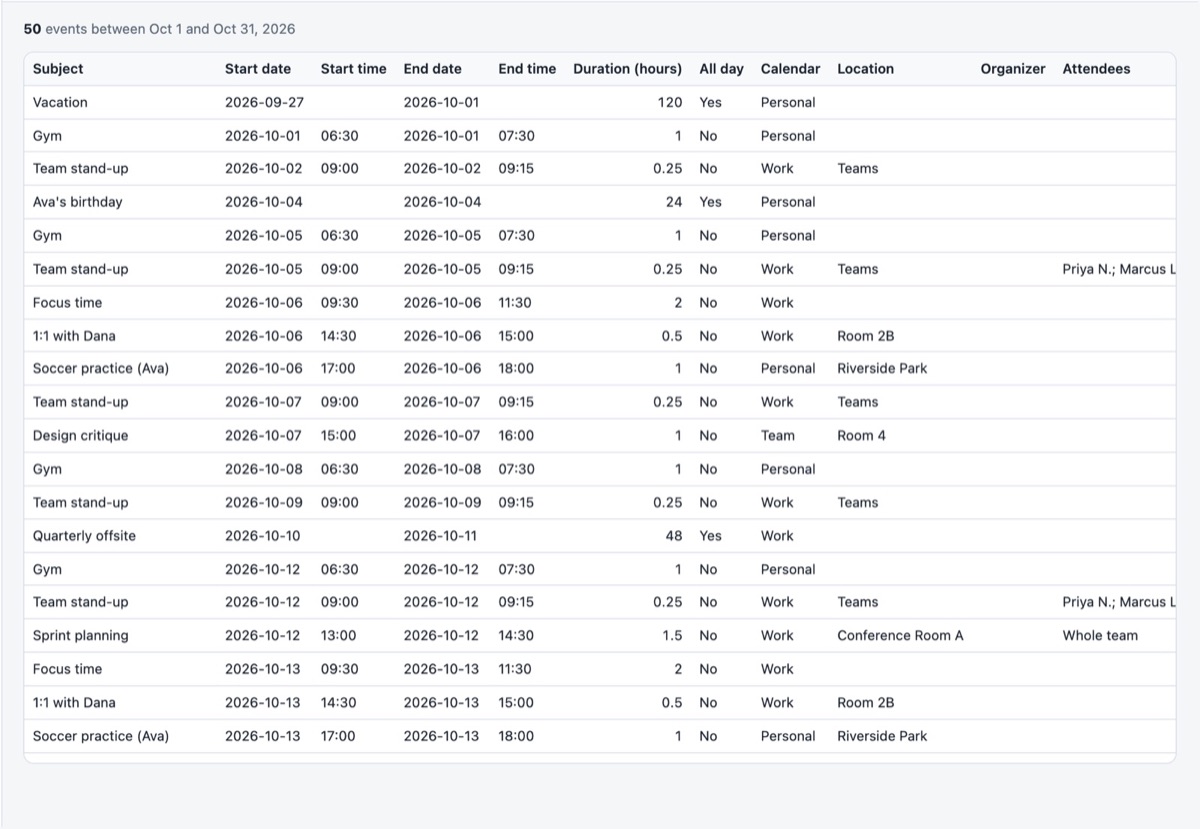
Outlook will not tell you how many hours you sat in meetings last month. The data is all there in the calendar, though, and a spreadsheet with a duration column answers the question in seconds.
Export your calendar Free to try. No account needed.
Get the report
- Open the app, sign in with Microsoft, tick your calendar.
- Choose the range: *last month* or a custom span.
- Tick Exclude all-day and "free" events so holidays and focus blocks do not count as meetings.
- Click Export .xlsx.
Read the numbers
- Hours by week (Pro): total hours per week; the quickest view of meeting load and how it trends.
- Hours by category (Pro): if you categorize meetings (1:1, project, customer, internal), the split by type.
- Calendar sheet: every meeting with its duration in decimal hours; add a pivot on *Organizer* to see who books your time, or on *Attendees* count to spot the large ones.
Make the numbers mean more
- Mark meetings you only optionally attend as Free in Outlook; they are then excluded from the totals.
- Give recurring meetings a category once; every occurrence inherits it.
- Export a shared team calendar to measure the team's meeting load rather than your own.
Your calendar, mail and contact data are read in your browser straight from Microsoft and are never uploaded to our servers.
Frequently asked questions
Does it count overlapping meetings twice?
Yes, by design: if you double-booked, both appear. Decline or mark one as Free to exclude it.
Can I compare two months?
Export each month to its own file, or export a custom range covering both and use the Hours by week sheet.
Is the free plan enough?
The free plan exports the first 100 events; the hours-by-week and category sheets need Pro.
Is my calendar uploaded?
Your calendar, mail and contact data are read in your browser straight from Microsoft and are never uploaded to our servers.