 Macon Calendar Tools
Open app
Print your Outlook calendar on a Mac
The new Outlook for Mac has the same print limits as the new Outlook for Windows: it prints the current view and offers no tri-fold, landscape month or detailed week. On a Mac the fix is a browser tab, with nothing to install.
Print your calendar now Free to try. No account needed.
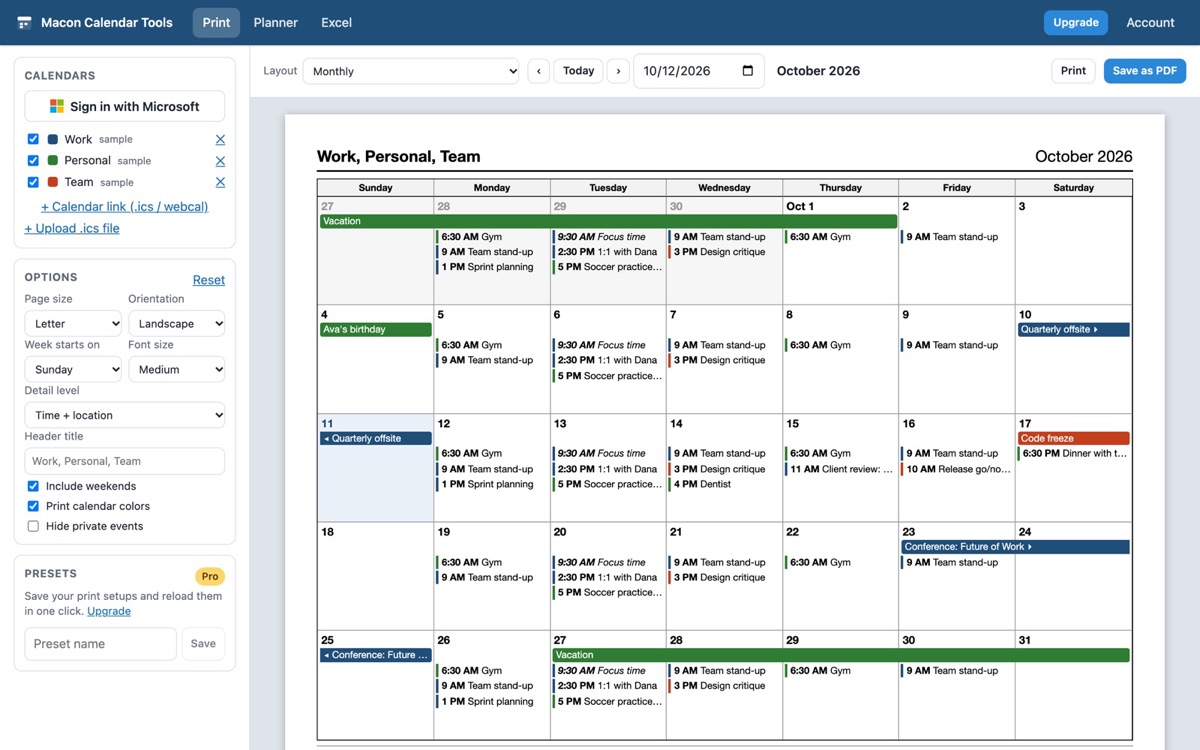
How to print an Outlook calendar on a Mac
- In Safari, Chrome or Edge, open the app and click Sign in with Microsoft. Your Outlook calendars (and any shared or group calendars) appear in the list.
- Pick a layout: monthly, weekly and daily are free; tri-fold, weekly with details, multi-week, yearly and agenda are Pro.
- Click Print. In the macOS print sheet, choose your printer, or click the PDF menu at the bottom-left and *Save as PDF*.
Mac print-sheet tips
- Set Paper Size in the macOS sheet to the same size you chose in the app (US Letter or A4).
- Leave Scale at 100%; the page is already sized to fit.
- Untick Print headers and footers in Safari so the browser does not add the URL and date.
- For colors, make sure Print backgrounds is on (Safari: File, Print, Safari options).
Works with every Outlook on the Mac
Whether you use the new Outlook for Mac, legacy Outlook for Mac, Outlook on the web, or a personal Outlook.com account, the app reads the same calendar through your Microsoft account. Apple Calendar users can print an iCloud calendar the same way by pasting its public ICS link.
Your calendar, mail and contact data are read in your browser straight from Microsoft and are never uploaded to our servers.
Frequently asked questions
Do I need to install anything on the Mac?
No. It runs in Safari, Chrome, Firefox or Edge. You can add it to the Dock from Safari's File menu (Add to Dock) if you print often.
Can I print from an iPad?
Yes, from Safari on iPadOS using AirPrint or Save to Files as a PDF.
Does it print Apple Calendar or iCloud calendars?
Any calendar with a public .ics link can be added with "+ Calendar link"; iCloud calendars can be published from Calendar on the Mac.
Is my calendar uploaded?
Your calendar, mail and contact data are read in your browser straight from Microsoft and are never uploaded to our servers.